Add an Interactive Seat Map to Flutter: SDK, Holds, Checkout
Mount the public-preview SeatLayer SDK in Flutter, keep holds and payment server-side, and survive backgrounding, expiry, and 409 conflicts.
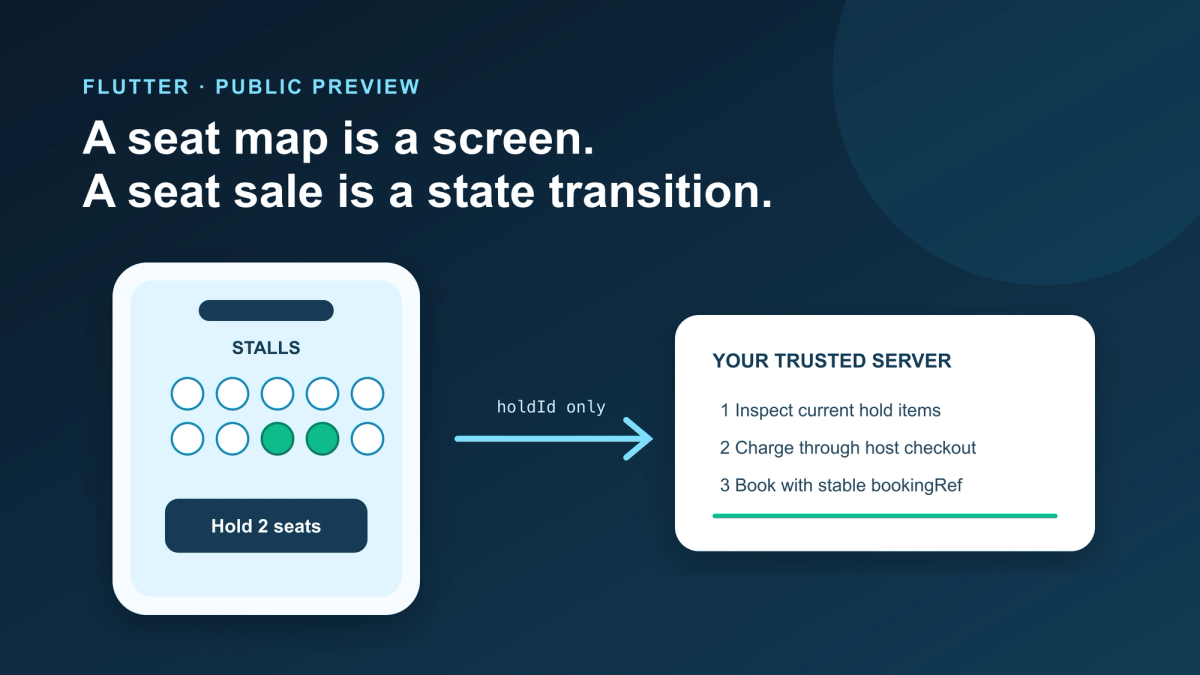
A seat map is a visual component. A seat sale is a distributed state transition. Flutter has to present the first without pretending it owns the second.
The failure that appears after the demo
The first version of a Flutter seat selector is usually satisfying. A GridView, a list of seat objects, three colors, and a selected set can produce a convincing screen in an afternoon. A Flutter seat map SDK becomes valuable when that screen must share a live reservation contract with checkout and other buyers.
The trouble starts when the app leaves that screen.
A buyer taps A-12. The app highlights it. The buyer opens a payment sheet, backgrounds the app, and returns after another buyer has taken A-12. If the app treats its local selected set as authority, it can display a seat that is no longer available, charge for a stale choice, or send a booking request with no way to explain the conflict.
The fix is not a more elaborate StatefulWidget. It is a boundary:
- Flutter renders a chart and expresses a buyer's selection.
- The seating service creates a temporary hold against an event's live inventory.
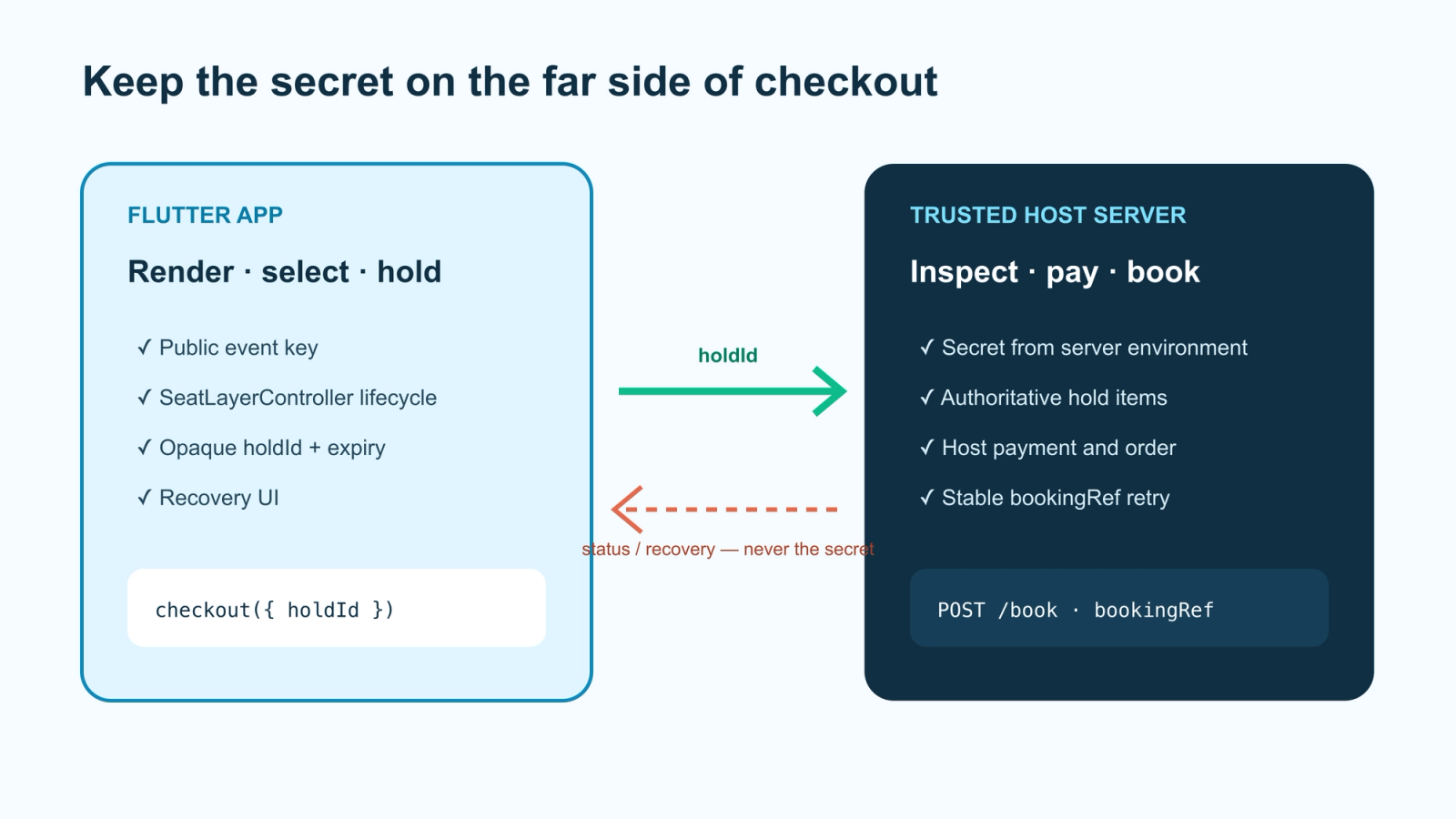
- The host server inspects that hold, owns payment, and books with a stable order reference.
That boundary also changes how you choose an SDK. You are not only choosing a way to draw seats. You are choosing how much of the chart, hold, lifecycle, and recovery contract your team wants to own.
Separate chart, event, selection, and hold
Four words are easy to collapse into one object in a mobile model:
| Concept | Meaning | Mobile implication |
|---|---|---|
| Chart | Reusable venue geometry: rows, sections, tables, labels, floors, and categories | It can be reused by many events; it is not the live sale |
| Event | A published chart with its own inventory | Pass an event-scoped identifier to the buyer surface |
| Selection | The buyer's current intent on screen | It can disappear on navigation, reload, or conflict |
| Hold | A server-created temporary reservation | Persist the opaque hold reference only as long as your checkout flow needs it |
The distinction matters in Flutter because widget state is short-lived by design. A screen can be disposed and rebuilt. A hold has an expiry and a server-side status. Treating both as one Seat model creates an attractive API and a fragile checkout.
Choose the Flutter surface
There are three defensible choices. The right one depends on product differentiation, not on a belief that every seat map should be native.
1. The public-preview Flutter package
SeatLayer currently publishes a Flutter package called seatlayer as a public preview. The package provides a typed Flutter view, controller, commands, and event streams on iOS and Android. The preview label is important: pin the documented version and run a test event on physical devices. Exercise the hold, expiry, release and conflict paths before committing to it.
The current mobile documentation shows the shape of the integration:
import "package:seatlayer/seatlayer.dart";

final controller = SeatLayerController();

SizedBox(
  height: 640,
  child: SeatLayerView(
    controller: controller,
    configuration: SeatLayerConfiguration(
      event: "ev_your_event_key",
      currency: "USD",
    ),
    onReady: (info) {
      debugPrint("SeatLayer ready: ${info.mode.raw}");
    },
  ),
);
The important code is not the constructor. It is the ownership around it:
eventis public event-scoped material, not an account secret;- the controller belongs to the screen and must be disposed with it;
- the host server still inspects the hold and performs the trusted booking call;
- the app must show a useful state when the preview cannot load or inventory has changed.
The mobile docs describe the shared native contract—hold, resume, extend, release, best available, selection, view commands, and destroy—but your article should use only the commands exposed by the version you actually test. Do not copy a future command from a branch README into a published guide.
Read the SeatLayer Flutter/mobile SDK documentation for the current preview status and install instructions.
2. A controlled WebView
If you need the stable browser SDK today, host an immutable integration page and load it in a WebView. This is not a shortcut around security. It is a different ownership boundary:
Flutter screen
  └─ owned WebView
       └─ immutable SeatLayer integration page
            ├─ browser SeatPicker
            ├─ event inventory and holds
            └─ narrow, origin-validated message bridge
                 └─ native checkout/navigation
Keep the bridge narrow. A checkoutReady message carrying an opaque holdId is easier to validate than a bridge that accepts price, seat status, or arbitrary booking commands from the page. Validate the page origin. Validate the message schema. Make the native side reject any message type it does not recognise.
The WebView route is especially useful when your web and mobile products must share one buyer surface. It is also where lifecycle bugs become visible: the page can reload, history can be disabled, and the native process can be suspended while a hold is active.
The bridge should be an allowlist
An integration page should emit a small set of messages such as ready, hold-created, checkout-requested, and error. The native side should validate:
- message origin and page identity;
- message type against an allowlist;
- event key against the host route;
holdIdshape and current checkout session;- maximum message size and expected version.
Do not create a generic bridge that forwards arbitrary JSON to a native booking method. That makes a content or navigation bug indistinguishable from a user-approved action. Keep payment, order creation, and secret-bearing calls in the host application just as you would with the native preview package.
The custom application integration guide documents the browser/server boundary and the WebView handoff. Treat it as the source for the bridge contract, not an old blog snippet.
3. Build the selector yourself
DIY is reasonable when the selection is static, small, internal, or deliberately part of your product's differentiated venue engine. It is a poor fit when the team needs reusable authoring, live multi-buyer inventory, temporary holds, accessibility, operational blocking, and booking reconciliation at the same time.
The fair question is not “Can Flutter draw this?” It can. The question is “Which parts of the reservation system should our team own for the next two years?”
Mount the public-preview package
Give the map a definite height or make it full-screen. Do not put a gesture-driven map inside a second scroll/zoom surface and then debug competing pinch recognizers later.
An integration wrapper should own three things:
class SeatMapScreen extends StatefulWidget {
  const SeatMapScreen({super.key, required this.eventKey});

  final String eventKey;

  @override
  State<SeatMapScreen> createState() => _SeatMapScreenState();
}

class _SeatMapScreenState extends State<SeatMapScreen> {
  final controller = SeatLayerController();

  @override
  Widget build(BuildContext context) {
    return SeatLayerView(
      controller: controller,
      configuration: SeatLayerConfiguration(
        event: widget.eventKey,
        currency: "USD",
      ),
      onReady: (info) => _recordReady(info),
      onLoadError: (error) => _recordLoadError(error),
    );
  }

  @override
  void dispose() {
    controller.dispose();
    super.dispose();
  }
}
We compile-checked this wrapper on Flutter 3.44.0 against the pinned seatlayer: 0.1.1 dependency. That check caught a documentation-copying mistake we would otherwise have shipped: SeatLayerConfiguration is not a const constructor in this release, and the controller's screen-lifecycle method is dispose(). We treat a live test event and a physical-device pass as the real rollout gate; a successful compile is not evidence of production readiness.
Make the preview boundary observable
We never hide the preview behind a generic Loading... widget. Give the wrapper a small state model that lets the rest of the app tell the difference between “the chart is loading,” “the event is closed,” and “the map is ready but a command failed.” The exact event names depend on the pinned package release, but the application states do not:
sealed class SeatMapStatus {
  const SeatMapStatus();
}

final class LoadingSeatMap extends SeatMapStatus {
  const LoadingSeatMap();
}

final class ReadySeatMap extends SeatMapStatus {
  const ReadySeatMap(this.mode);
  final String mode;
}

final class RecoverableSeatMapError extends SeatMapStatus {
  const RecoverableSeatMapError(this.message);
  final String message;
}
That wrapper prevents a controller exception from becoming an unhandled screen crash and gives product design a place to explain recovery. It also makes preview testing less subjective: a test can assert that a failed load produces a retryable state, not only that a widget exists.
Keep checkout state outside the renderer. A host-side adapter might expose a small application contract like this:
class SeatCheckoutIntent {
  const SeatCheckoutIntent({required this.eventKey, required this.holdId});

  final String eventKey;
  final String holdId; // opaque; not a price or seat-authority substitute
}
The app can pass that intent to its cart or checkout route. It should not calculate a trusted total from labels or prices supplied by the mobile surface.
Preserve the hold, not the selection fiction
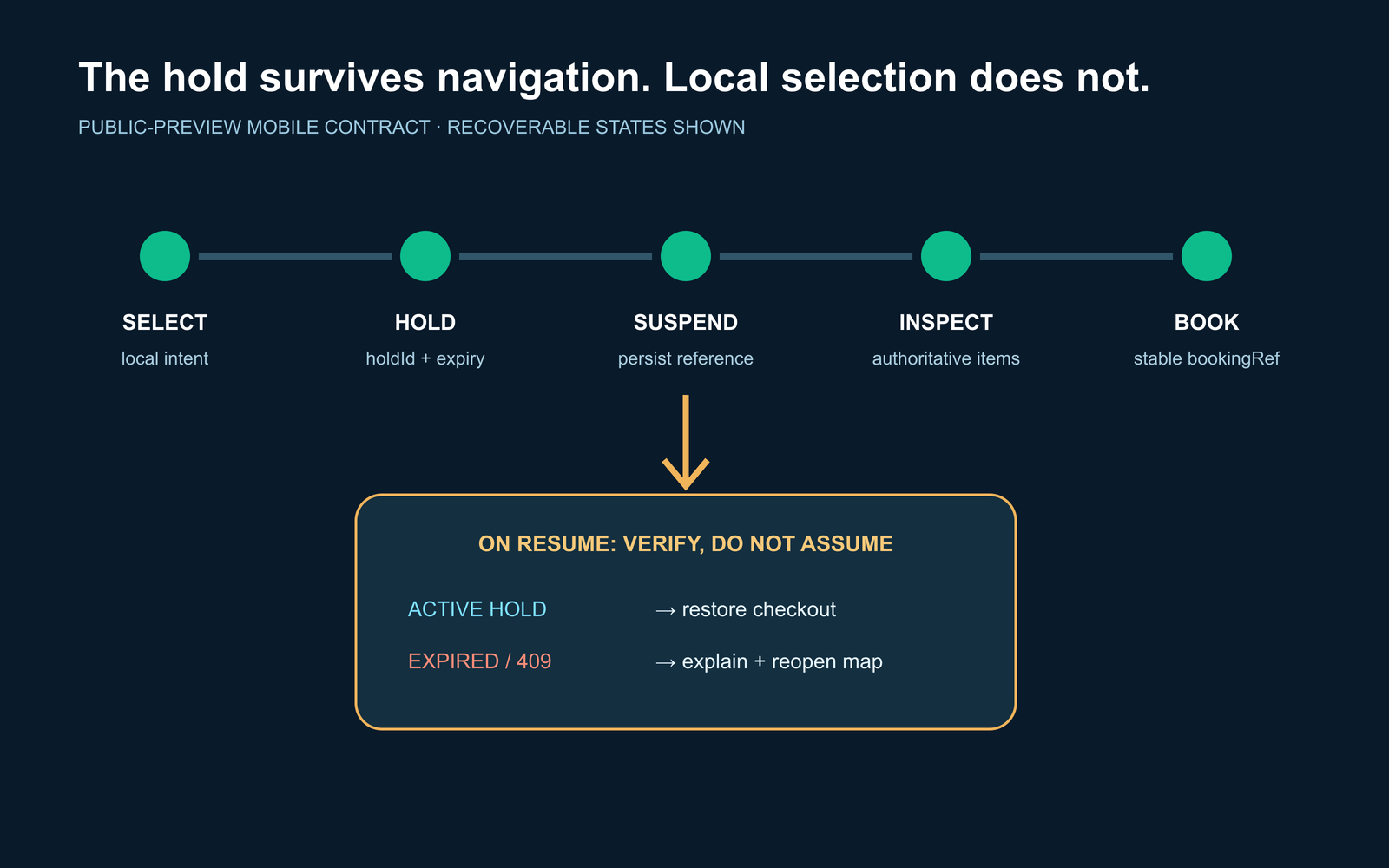
When a buyer leaves the seat screen, persist only what your checkout contract needs. A local selection such as ["A-12", "A-13"] is a preference that may be stale. An opaque holdId plus its expiry is a server result that can be inspected. If the app promises resume after suspension, store the hold reference in the host checkout state and ask the server whether it is still active when the screen returns.
This is a subtle but important distinction for Flutter state management. A Riverpod provider, Bloc, or ChangeNotifier can preserve a value across widget rebuilds; none of them extends a hold or turns an expired value into a valid reservation. The state manager is a good home for a checkout state machine. It is not a replacement for the inventory service.
Keep payment and booking on the server
The buyer app can receive a hold reference. It should not receive the account credential used to book inventory. The trusted server flow is intentionally boring:
- receive the host cart/order identifier and opaque
holdId; - inspect the current hold on the server;
- calculate payment from the authoritative returned items;
- charge through the host's payment system;
- book with the same stable host order ID as
bookingRef; - when payment cannot complete, explicitly return inventory or rely on documented expiry;
- reconcile later changes through the documented webhook path.
That server boundary also makes an ambiguous network response survivable. If a booking request times out after payment, retry the same logical operation with the same bookingRef; do not create a second order because the first response was slow.
Handle suspension, expiry, and conflicts
Mobile apps make state transitions visible. Write the recovery behavior before styling the error sheet.
| Situation | What the app knows | Useful response |
|---|---|---|
| App is backgrounded during selection | Local view may be gone; hold may still be active | Reconnect, show current hold status, and let the buyer resume or return to the map |
| Hold expired | The buyer no longer owns those seats | Clear the stale hold, explain the expiry, and reopen selection |
| Another buyer wins | The server rejects the requested transition | Mark the affected seats unavailable and preserve unrelated selections where possible |
| WebView/page reloads | Native shell may have lost transient callbacks | Re-establish the bridge, query current state, and never assume the previous selection is valid |
| Payment succeeds but booking is ambiguous | The commercial order exists; inventory result is unknown | Retry with the same booking reference and surface a pending state to operations |
Do not solve these cases with a disabled button. A disabled button can improve the interface, but it cannot serialize two buyers on different devices.
Test the mobile edge cases
The preview verification checklist should be a physical-device checklist, not only a widget test:
- iOS and Android installation from the exact pinned package/revision;
- a test event rendering with live inventory;
- single and multiple selection;
- hold, resume, extend, release, and expiry;
- a second buyer taking the same seat;
- rotation, safe areas, keyboard, back navigation, and process suspension;
- parent-scroll and map-gesture interaction;
- screen-reader labels, contrast, focus order, and a non-color seat-state explanation;
- a 2D fallback when optional 3D is unavailable;
- controller destruction when the screen leaves the tree.
If the package fails one of these gates, don't paper over it. We would rather ship the boring path than a preview we can't stand behind. Use the controlled WebView path, document the trade-off in your own repo, and revisit the preview after its contract changes.
Accessibility is part of the integration
The chart engine can expose seat states, but the Flutter shell still owns the surrounding experience. Check that a buyer can:
- identify the event and section before touching the map;
- understand free, held, sold, blocked, and selected states without relying on color alone;
- reach the selection summary and checkout action with the expected input method;
- recover when a seat becomes unavailable after focus or resume;
- receive the same hold/expiry language in a live region, dialog, or accessible status component;
- zoom or move through a large chart without trapping focus in an off-screen canvas.
If the map is a native preview or a WebView, test the wrapper and the rendered surface separately. “The widget has semantics” is not the same as “the purchase flow is understandable.”
A practical review record
Before approving a Flutter integration, keep a short record with:
| Check | Evidence |
|---|---|
| Package maturity | Pinned version/revision and public preview label |
| Render | Test event appears on physical iOS and Android devices |
| Commands | Selection, hold, resume, release, expiry, and conflict exercised |
| Checkout | Opaque hold crosses into host order state; no secret in the app |
| Lifecycle | Background, rotation, back navigation, and destruction verified |
| Accessibility | Status, focus, contrast, and non-color state explanation reviewed |
| Fallback | WebView or 2D path documented if preview/3D is unavailable |
That record is more valuable than a screenshot because it tells the next engineer what was actually tested.
The decision in one sentence
Use the public-preview Flutter package when its tested contract fits your product and you accept its maturity. Use a controlled WebView when the stable browser surface and one shared buyer experience matter more. Build the selector yourself when the selector—not inventory infrastructure—is the thing you are deliberately inventing.
Verification record
Our test fixture pins seatlayer: 0.1.1. On 11 August 2026, flutter pub get, flutter analyze, and two focused contract tests passed under Flutter 3.44.0/Dart 3.12.0. Our tests verify the event-scoped configuration and the Stream<HoldResult>/Stream<void> hold lifecycle. They deliberately do not claim a live-event, physical-device, latency, or reliability result.
Is the SeatLayer Flutter package ready for production?
It's published as a public preview, not a stable release. Pin the documented version, run a scoped test event on physical iOS and Android devices, and keep a controlled WebView as your fallback path. A clean `flutter analyze` is not evidence of production readiness.
Do I need a WebView, or is there a native Flutter widget?
Both paths exist. The preview package gives you a Flutter-native surface; a controlled WebView wrapping the JavaScript renderer is the stable alternative. Choose the WebView when you need the mature contract today, and the package when you've cleared it on your own device matrix.
What happens to a seat hold when the buyer backgrounds the app?
The hold lives on the server with its own expiry, so it survives navigation and app suspension — but your local selection state does not. Persist the opaque hold reference, then re-verify it on resume rather than assuming the seats are still yours.
Should the Flutter app call the booking API directly?
No. Keep payment and booking on a trusted server. The app should pass an event key and a hold reference; the server inspects the hold, charges through your checkout, and books with a stable order reference. Secret-bearing calls do not belong in a mobile binary.
How should the app handle a 409 conflict after checkout?
Treat it as a normal, expected state rather than an error screen. Explain that the seats were taken or the hold expired, reopen the map with fresh inventory, and preserve as much of the buyer's intent as you can — section, price band, and party size.

How Much Does It Cost to Hire a Flutter Developer in 2026? Rates, Salary Bands, and App Development Cost
How much does it cost to hire a Flutter developer? $15–$150/hr depending on region and seniority — breakdown by India, US, and Eastern Europe rates.
Top Flutter App Development Companies in 2026 — A Buyer's Shortlist (India + Global)
Top 10 Flutter app development companies in India (2026) — vetted by portfolio, scale, pricing, and Flutter delivery experience for production builds.
AI in Banking — Use Cases, Named Bank Precedents, and Eval Methodology (2026)
How AI is used in banking — fraud detection, credit scoring, customer service automation, RegTech, and the use cases banks are deploying right now.

AI Healthcare Companies in 2026 — A Curated Vendor Map (Clinical AI, Diagnostics, Drug Discovery, Mental Health)
An evaluator's shortlist of 36 named AI healthcare companies grouped by category, with the criteria we use when shortlisting vendors for hospital and health-system buyers.